| |
 |
Secure |
FTPS (FTP over TLS/SSL) and SFTP (SSH) are supported. Nobody can see your data during FTP file sync. |
| |
 |
Real Time Sync |
With Real Time Sync feature, FTP Synchronizer monitors files and synchronizes them as soon as they are created, updated or deleted. It works in background, no user interaction is required. |
| |
 |
High performance |
FTP Synchronizer cares about your time and working efficiency.
- Block-Level sync. Reducing time of sync from hours to seconds! ( ? )
- Fast remote folder scan. Save 90% of your time ( ? )
- Multi-connection sync engine to synchronize multiple files, even multiple servers, simultaneously.
|
 |
Well done and thanks. I looked at several solutions before settling on yours.
- Doug Beard
Excellent product, provides the solution I need. Reliable and easy to use. Have recommended it to friends who have purchased licenses and use for web site backup.
- Roger Cocks |
 |
Main Features:
- Real Time Sync
This is an unique feature in FTP Synchronizer. Your files will be synchronized immediately when they are created, updated or deleted. ( ? )
- Only changed files will be synchronized!
Unlike other software which copy all files every time, even if they are not changed. FTP Synchronizer syncs changed files only. It'll save a lot of bandwidth, and more important, your precious time. ( ? )
- Block-Level Sync
Reducing time of sync from hours to seconds by synchronizing only changed part when a file is updated. ( ? )
- Automatic FTP sync
Sync files automatically without user interaction and receive email notification when it's completed. You can use built-in scheduler or any other scheduler program to automate FTP sync.
- Run FTP Synchronizer as a Window Service
Keep files in sync 24 hours a day, 7 days a week, no matter you logged in or not ( ? )
- Secure FTP connection
Secure SSL and SFTP connection ensures nobody can see your data during transfer (?)
- Integrity verification
FTP Synchronizer can verify (CRC, MD5 or SHA1) the files after sync to make sure they were synchronized 100% correctly. ( ? )
- High performance multiple connections file transferring
Uploading/downloading multiple files with different servers at the same time.
- Handle different time zone
Synchronize files correctly even if the time zone between local computer and FTP server is different.
- Conflict detection
How about if you modified a same file in both local and remote computer? Most software can NOT handle this, they simply overwrite older files with newer. Please, don't do this! FTP Synchronizer takes care this situation. You can ensure your files will not be overwritten by mistakes! ( ? )
- Proxy and firewall support
SOCKS4, SOCKS5, HTTP Proxy, Simply Relay, SOCKS4A, SITE hostname, OPEN hostname, USER user@host. etc ( ? )
- And much more...
|
If you're seeking a powerful and easy to use FTP file sync and FTP backup software, look no further...
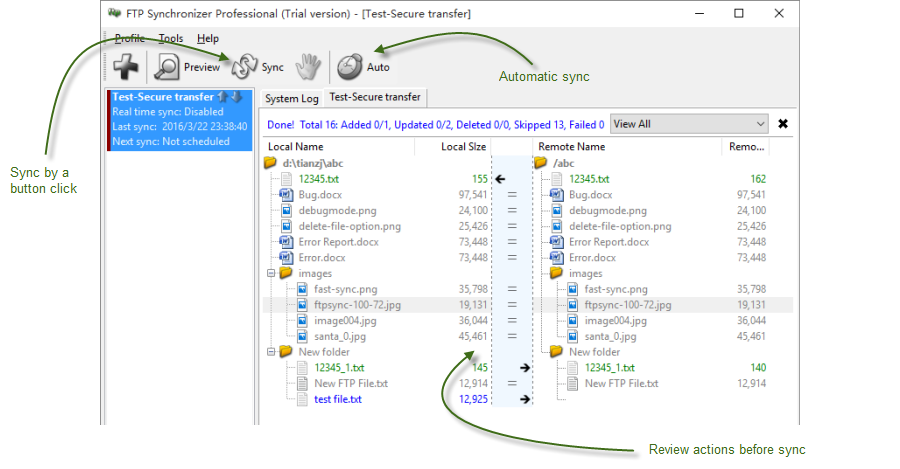
If you want to see how it works, don't miss the one minute tutorial. Need to synchronize files between two FTP sites instead? Click here to find more. |
|